


Introduction
The composite pattern allows you treat a group of objects like a single object. The objects are composed into some form of a tree-structure to make this possible.
This patterns solves two problems:
- Sometimes it is practical to treat part and whole objects the same way
- An object hierarchy should be represented as a tree structure
We do this by doing the following:
- Define a unified interface for both the part objects (Leaf) and the whole object (Composite)
- Composite delegate calls to that interface to their children, Leaf objects deal with them directly.
This all sounds rather cryptic, so let us have a look at the diagram:
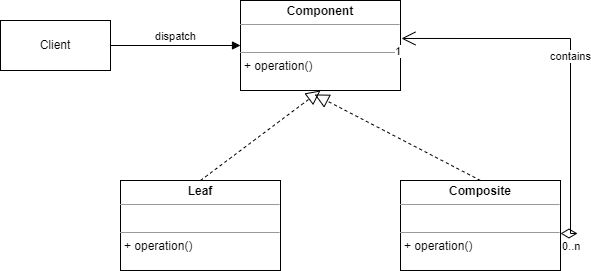
This is basically a graphical representation of the last two points: Composites delegate and Leafs perform the actual operation.
Implementation in Python
In this example we will deal with a country, and provinces.
To start we need to import these:
from abc import ABC, abstractmethod
from typing import List, Optional
Line by line:
- From the
abcpackage brings in Python’s built in tools for creating abstract classes. - From
typingwe import type hints which make the code more readable. For exampleList[str]is a list of string,Optional[str]denotes that a variable can be either a string orNone.
The Component base class
We start by implementing a Component base class which itself derives from the ABC, the “Abstract Base Class”:
class Component(ABC):

    def __init__(self, name: str) -> None:
        self._name = name
        self._parent: Optional['Component'] = None

    @property
    def name(self) -> str:
        return self._name

    @property
    def parent(self) -> Optional['Component']:
        return self._parent

    @parent.setter
    def parent(self, parent: Optional['Component']) -> None:
        self._parent = parent

    @abstractmethod
    def search(self, term: str) -> List['Component']:
        pass


    def add(self, component: 'Component') -> None:
        raise NotImplementedError("Cannot add to leaf component")

    def remove(self, component: 'Component') -> None:
        raise NotImplementedError("Cannot remove from leaf component")

    def is_composite(self) -> bool:
        return False

    def display(self, indent: int = 0) -> None:

        print("  " * indent + f"{type(self).__name__}: {self._name}")

    def __str__(self) -> str:
        return f"{type(self).__name__}: {self._name}"
Line by line:
- The
Componentclass derives from the Abstract Base Class. - Each component has a name.
- Each component may have a parent. When it is the root component it will have no parent, that is why we use the
Optionaltype. - Next we implement getters and setters for the name and for the parent.
- The
search()method is implemented as an@abstractmethodwhich means it will have to be implemented by the different subclasses. - The
add()andremove()methods raise aNotImplementedError. This has to do with the Composite’s principle of a uniform interface. However, not all subclasses should implement these methods, for example Leaf components which by definition have no children should not implement these methods. Marking these methods as@abstractmethodwould force the implementation of thse methods in all subclasses which makes no sense. - Next we have the
is_compositemethod which tells us whether there are children components. Since by default there aren’t any, so this method returnsFalse. - Next, two utility methods to make sure our components display in a user friendly fashion.
The Composite component
In our setup we define two subclasses of Component. The first one is the Composite:
class Composite(Component):

    def __init__(self, name: str) -> None:
        super().__init__(name)
        self._children: List[Component] = []

    def add(self, component: Component) -> None:
        self._children.append(component)
        component.parent = self

    def remove(self, component: Component) -> None:
        if component in self._children:
            self._children.remove(component)
            component.parent = None

    def is_composite(self) -> bool:
        return True

    def get_children_count(self) -> int:

        return len(self._children)

    def get_children(self) -> List[Component]:

        return self._children.copy()

    def search(self, term: str) -> List[Component]:
        print(f"Searching in {type(self).__name__}: {self._name} for term: {term}")
        results: List[Component] = []


        if term.lower() in self._name.lower():
            results.append(self)


        for child in self._children:
            results.extend(child.search(term))

        return results

    def display(self, indent: int = 0) -> None:

        print("  " * indent + f"{type(self).__name__}: {self._name}")
        for child in self._children:
            child.display(indent + 1)
Some notes:
- In the constructor, the base class’ constructor is first called, next we initialize the list of children, which contains elements of type
Component. - In the
add()method the child is added to the list of children. Next the parent of newly added child is set to the current component. - The
remove()method first checks if the component is in the children list. If so, it removes the child, and sets the removed child’s parent toNone - Since we are dealing with a composite, the
is_composite()method returnsTrue. - The two utility methods
get_children_count()andget_children()returns the number of children and a copy of the list of children. - In the
search()method we first check whether the current component matches the search term, and if so the component is added to the results list. Next, we iterate over the children list, and call thesearch()method on each of them, adding the results to the results list. Finally we return the results list - The
display()method displays the component and its children in a user friendly way.
The Leaf component
The Leaf does not need to implement or reimplement the is_composite(), add() or remove() methods, so the only method to implement (as demanded by the @abstractmethod decorator) is the search() method:
class Leaf(Component):

    def search(self, term: str) -> List[Component]:
        if term.lower() in self._name.lower():
            print(f"Found match in {type(self).__name__}: {self._name}")
            return [self]
        return []
This method checks whether the component’s name matches the search term, and if so, return a list with a single item, the Leaf component.
Concrete implementations
We will now add some concrete implementations:
class Country(Composite):
    def add_province(self, province: Component) -> None:
        self.add(province)

class Province(Composite):
    def add_city(self, city: Component) -> None:
        self.add(city)

class City(Leaf):
    pass
Line:
- A country has multiple provinces and a province can have multiple cities. Therefore, both
CountryandProvinceare of typeComposite. However, aCityin this simple setup does not have any children, and so subclassesLeaf. - Note that we have two wrappers around the
add()method:add_cityandadd_province.
Time to test
Let’s see if our setup works:
if __name__ == "__main__":

    country = Country("The Netherlands")
    province1 = Province("Noord Holland")
    province2 = Province("Zuid Holland")

    city1 = City("Amsterdam")
    city2 = City("Haarlem")
    city3 = City("Rotterdam")
    city4 = City("The Hague")


    province1.add_city(city1)
    province1.add_city(city2)
    province2.add_city(city3)
    province2.add_city(city4)

    country.add_province(province1)
    country.add_province(province2)

    print("=== Complete Hierarchy ===")
    country.display()


    print("\n=== Search Results ===")
    search_term = "ams"
    results = country.search(search_term)
    print(f"\nSearch results for '{search_term}':")
    for result in results:
        print(f"  - {result}")


    print(f"\n=== Tree Structure ===")
    print(f"Country has {country.get_children_count()} provinces")
    for province in country.get_children():
        if isinstance(province, Composite):
            print(f"Province '{province.name}' has {province.get_children_count()} cities")
            for city in province.get_children():
                print(f"  - {city.name}")


    print(f"\n=== Remove Demonstration ===")
    print(f"Before removal: Noord Holland has {province1.get_children_count()} cities")
    province1.remove(city2)
    print(f"After removal: Noord Holland has {province1.get_children_count()} cities")


    print("\n=== Updated Hierarchy ===")
    country.display()
Line by line:
- We start by country, called The Netherlands.
- Next we create two provinces, and four cities.
- We add the cities to the appropiate provinces.
- And finally we add the provinces to the country.
- Display the complete hierarchy.
- Demonstrate the search functionality.
- Show the tree structure.
- Finally show that remove works.
Conclusion
The composite pattern offers a powerful way to structure hierarchical data, enabling uniform treatment of both individual objects and groups. By defining a common interface and delegating responsibilities appropriately, it simplifies code and supports recursive operations like search and display. In our Python example, countries, provinces, and cities were elegantly modeled using this pattern, illustrating how Composite and Leaf classes interact in practice. The pattern not only promotes cleaner architecture but also makes extending the system straightforward. Whether you’re dealing with a file system, UI components, or geographical regions, the composite pattern can help you manage complexity by treating tree-structured data consistently. With Python’s support for abstract base classes and type hints, implementing the pattern remains clear and maintainable. As always, patterns are tools—not rules—but when used appropriately, the composite pattern can greatly enhance the flexibility and clarity of your designs.


