


Introduction
The flyweight pattern is a pattern that helps minimize memory usage by sharing and reusing data. A common example is wordprocessor where each character not only holds the character like ‘A’ but also things like markup and formatting data. Instead of having each element of a document carry all this data, this markup and formatting data is stored using flyweight patterns, to which the elements refer. This method saves a lot of memory.
So, flyweight objects can have:
- Intrinsic state: invariant and shareable, but also context independent (like aformentioned charachter ‘A’). This is what is also called the shared state
- Extrinsic state: that could be the position of the character in the document. This is also known as the unique state
So, what does it look like? Well, a very simple version is this:
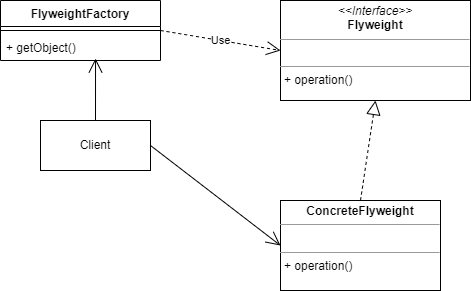
Implementation in Python
We will start this pattern by defining a very simply Flyweight class:
class CharacterFlyweight:
    def __init__(self, character: str, font: str, size: int):
        # Intrinsic state - shared across all instances
        self._character = character
        self._font = font
        self._size = size

    def render(self, x: int, y: int, color: str):
        # Extrinsic state - context-specific
        print(f"Rendering '{self._character}' at ({x},{y}) in {color}")
To keep things simple I chose a string as the intrinsic state, but this could of course be any object. A nice extension would be to use generics, but I might come to that in a later article.
The Flyweight-structures need to be managed, and which is the task of the CharacterFactory:
class CharacterFactory:
    def __init__(self):
        self._flyweights: dict[tuple, CharacterFlyweight] = {}

    def get_character(self, char: str, font: str, size: int) -> CharacterFlyweight:
        key = (char, font, size)
        if key not in self._flyweights:
            self._flyweights[key] = CharacterFlyweight(char, font, size)
        return self._flyweights[key]

    def get_pool_size(self) -> int:
        return len(self._flyweights)
This code is a bit more involved:
- The
CharacterFactoryclass has a (hash)map or dictionary, with tuples as keys and Flyweight structures as values. - The
get_character()method does two things: if the key does not exist (that is checked for in the first if statement), then a new Flyweight is made and added to the map - Finally we return the request
Flyweight - We also add a method to keep track of the pool size.
Test the code
Now we can test our code:
if __name__ == "__main__":
    factory = CharacterFactory()

    for i in range(5):
        char = factory.get_character('A', 'Arial', 12)
        char.render(i * 10, 100, 'black')

    print(f"Flyweights created: {factory.get_pool_size()}")  # Only 1
Line by line:
- We create a new FlyweightFactory
- We enter a loop
- We try to get a
Flyweightwith the specified intrinsic state 5 times, and render it different positions. - Finally we print out the size of the factory pool, which should still be 1.
Conclusion
The Flyweight pattern stands out as a powerful structural design pattern in Python, offering an elegant solution to the perennial problem of high memory consumption, particularly when dealing with a vast number of similar, fine-grained objects.
As demonstrated through the CharacterFlyweight and CharacterFactory implementation, the core principle is the separation of an object’s state into two categories: the intrinsic state (the shareable, invariant data like the character and its formatting), and the extrinsic state (the unique, context-dependent data like its position).
By utilizing the factory to manage a pool of flyweight objects, we ensure that resources are not wasted by creating duplicate objects. Instead, the factory reuses existing flyweights corresponding to the same intrinsic state, dramatically reducing the total number of objects and, consequently, the memory footprint. In the example, we saw five separate rendering calls utilize only one flyweight instance.
This pattern is a perfect fit for scenarios like word processors, game graphics, or any system where a multitude of entities share common static properties, allowing for a substantial gain in efficiency without sacrificing necessary unique context.


