


Introduction
The observer pattern is a software design pattern that allows an object, usually called the subject, to maintain a list of dependents, called observers, and notify them automatically of any state-changes. Many languages have this pattern either built-in or in their standard libraries.
Examples:
- C# has the concept of Observable in the standard .NET library. Also it has the concept of delegates.
- Although Dart doesn’t have it, in Flutter we have the SetState method which automatically notifes any observer, and it is mainly used to refresh the UI.
It looks like this:
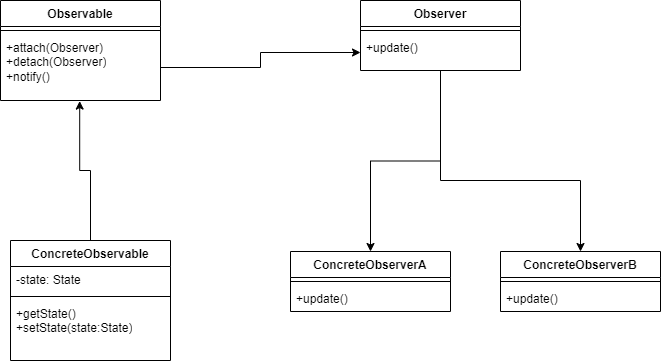
A breakdown of this diagram:
- First there is the Observable, this could be an interface, the object which is to be observed. The observable holds a list of observers.
- The Observer, which sends out a message to the observers. This could also be an interface.
- The ConcreteObservable, the concrete class which holds the state. If anything changes in the state, the setState method is called, which in turn calls the notify method. That in turn notifies the observers.
- The concrete observers which handle the state change.
Here the notify and update methods have no parameters, you could of course send extra data to the observers, and in most cases that will happen.
Implementation in Python
Before we start we need to import the following things:
from abc import ABC,abstractmethodWhat does this mean?
ABCstands for ‘Abstract Base Class’ which means a class can contain abstract methods, i.e. methods which are not implemented in the class itself but only in its subclasses.- We use the
@abstractmethodattribute to indicate such methods.
We start by creating an Observer class. Note the use of ABC and @abstractmethod:
class Observer[T](ABC):
    @abstractmethod
    def update(self, new_state: T):
        pass
The Observer class has an update() method, which receives updates from the Observer‘s subject. It also carries the new value for the subject’s state.
Talking of the subject, here is the implementation of the Subject class:
class Subject[T]:
    def __init__(self,initial_state: T):
        self._observers: list[Observer[T]] = []
        self._state: T = initial_state

    def attach(self, observer: Observer[T]):
        self._observers.append(observer)
        return self

    def detach(self, observer: Observer[T]):
        self._observers.remove(observer)
        return self


    def notify(self):
        for observer in self._observers:
            observer.update(self._state)

    @property
    def state(self) -> T:
        return self._state

    @state.setter
    def state(self,new_state: T):
        self._state=new_state
        self.notify()
- In the constructor we construct an empty list of observers, and an initial state
- The
attach()method attaches an observer to the subject, so the observer can receive updates. It returnsselfso we can chain calls to this method. - In the
detach()method the reverse happens - To send an update to the observers we use the
notify()method. In it we iterate over the list of observers, and send each anupdate()message, with the current state of theSubjectas its parameter. - We use the
@propertyattribute for setting and getting the state. Note that in the setter we call theupdate()method to notify the observers of a state change. The beauty of this is, is that it is completely transparent to the clients.
Next we implement a couple of observers:
class ConcreteObserver1(Observer):
    def update(self, new_state):
        print(f"ConcreteObserver1 received notification: {new_state}")

class ConcreteObserver2(Observer):
    def update(self, new_state):
        print(f"ConcreteObserver2 received notification: {new_state}")
Some notes:
- Each observer has a subject from which it receives update.
- In the update we print out the state of the observed subject.
Time to test
We can now test our simple setup:
if __name__ == "__main__":
    subject = Subject("state 1")
    observer1 = ConcreteObserver1()
    observer2 = ConcreteObserver2()

    subject.attach(observer1).attach(observer2)

    subject.state = "state 2"
    subject.state = "state 3"

    subject.detach(observer2)

    subject.state = "state 4"
You should output like this:
ConcreteObserver1 received notification: state 2
ConcreteObserver2 received notification: state 2
ConcreteObserver1 received notification: state 3
ConcreteObserver2 received notification: state 3
ConcreteObserver1 received notification: state 4
Conclusion
The Observer pattern is a fundamental and exceptionally useful design pattern for creating loosely coupled systems where changes in one object (Subject) need to be communicated to many others (Observers) without the objects being tightly bound together.
In this article, we successfully implemented a robust, yet straightforward, version of the Observer pattern in Python.
We achieved this by:
- Defining the abstract
Observerclass, guaranteeing all concrete observers implement the essentialupdate()method. - Creating the generic
Subjectclass to manage a list of observers and handle the core logic of attaching, detaching, and notifying them. - Leveraging the
@propertydecorator in Python to make state changes transparent to client code. By triggering thenotify()method automatically within the state setter, we ensured that every modification to the subject’s state is immediately broadcast to all registered observers.
This implementation provides a clean, scalable way to manage one-to-many dependencies. The Observer pattern is not just a theoretical concept; it’s the driving force behind many crucial software components, including event handling systems, Model-View-Controller (MVC) architectures, and dynamic UI updates. By understanding and implementing this pattern, you equip yourself with a powerful tool for designing flexible and reactive software applications.
In one of my next articles I will look at this pattern in a multi-threaded environment, as this will create some big challenges.


