


Introduction
The singleton pattern restricts the instantiation of a class to a single instance. The singleton pattern makes it possible to ensure that:
- The creation of a class is controlled (in some languages like C# or Java this is done by making the constructors private)
- The one instance we have is easily accessible
- The singleton pattern ensures we only have at most one instance of a class during the running of our application.
One of the main uses of the singleton pattern is logging, as all clients who wish to log need a single point of entrance.
The UML diagram of this pattern is very simple:
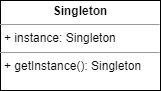
A Singleton has
- a private constructor, or a static constructor. In the constructor, a check is done to see if there is an instance of the Singleton. If there is, that instance is returned, if not a new one is made, stored and returned
- It contains an instance of itself, in some languages this is stored in a private field.
- The getInstance() method is used to get the single instance. If there is no instance yet, the constructor is called and a new instance is made.
The use of singletons is usually not recommended, and even though they are one of the seemingly simpler Design Patterns, their implementations can lead to some difficulties especially in multithreaded environments. Therefore we will build a threadsafe implementation in Python. In our example we will make our Singleton threadsafe, with the use of locking.
In this article I will be using Python 3.12, so the code might not work on earlier versions
Implementing the singleton
We will start with the preliminaries:
from __future__ import annotations
import threading
import random
import time
Line by line:
- the
from __future__import enables postponed evaluation of annotations, which enables the use of forward references in type hints. This is very important, since theSingletonclass as we shall see will need to reference itself. - The
threadingmodules is needed for two things: it supplies theLockclass for creating thread synchronization objects. It also provides theThreadclass which enables the creation and management of multiple threads. - To make the simulation a bit more realistic we will let the threads sleep for a random time, so we need the
randomandtimepackages.
Next we implement the Singleton:
class Singleton:
    _instance_lock: threading.Lock = threading.Lock()
    _instance: Singleton | None = None

    def __init__(self) -> None:
        if not hasattr(self, '_value'):
            self._value = 0
            self._value_lock = threading.Lock()

    def __new__(cls) -> Singleton:
        if cls._instance is None:
            with cls._instance_lock:
                if cls._instance is None:
                    cls._instance = super().__new__(cls)
        return cls._instance

    def increment_value(self) -> int:
        with self._value_lock:
            self._value += 1
            return self._value
Line by line:
- There are two class level variables,
_instance_lockwhich is used to lock the instance for accessing, and_instance, which is the singleton instance itself. - Next comes the constructor. To prevent double initialization of the value, the
hassattr()function is used. - The
__new__method is called before the constructor, and this method actually returns the singleton instance. It starts by checking if we have an instance, and if there is one, it returns it. However if there is none, once again we check for the existence of an instance since this may have been created by another thread. If there is still none, we create one. Finally we return the instance. - The value of this example singleton is an int, and the
increment_value()method increases this value. It does in in a thread safe manner, by first locking the value, so only thread can access it, incrementing the value and returning it.
Putting it to the test
Now we can test it:
def run_thread():
    s: Singleton = Singleton()
    wait_time: int = random.randint(1, 4)
    print(f"Thread {threading.current_thread().name} waiting for {wait_time} seconds")
    time.sleep(wait_time)
    value = s.increment_value()
    print(f"Thread {threading.current_thread().name} incremented value to {value}")

if __name__ == "__main__":
    threads: list[threading.Thread] = []

    for _ in range(10):
        thread: threading.Thread = threading.Thread(target=run_thread)
        threads.append(thread)
        thread.start()

    for thread in threads:
        thread.join()
The run_thread() method
This method does the following:
- It acquires a Singleton object
- It generates a random number, and waits for that number seconds.
- Next it prints out the name of the current thread, and the current value.
The main test
Also here a line by line explanation is needed. Information on the threading library can be found here.
- A list of threads is initialized to an empty list. Observe that we explicitly define the type to be a list of threads
- Next we iterate 10 times, each time creating a new thread. The target parameter is a callable object, in our case a function.
- We append this thread to our thread list
- We start the thread
- Next we iterate over our threadlist, and we wait for all the threads to terminate
Try running this, and you should a random execution of threads while the value keeps steadily increasing
Conclusion
Despite its apparent simplicity, the singleton design pattern can introduce complexities, especially in multithreaded environments where multiple threads might attempt to create an instance simultaneously. The provided thread-safe implementation in Python addresses these challenges by using locks to ensure only one thread can create the singleton instance at a time. This approach guarantees that even with multiple threads running concurrently, the integrity of the single instance is maintained. Although the use of singletons is often debated and not universally recommended, understanding how to implement them safely—as demonstrated in this article—is a valuable skill. This pattern remains relevant for specific use cases like logging or configuration management where a single point of access is essential.


