

Introduction
The command pattern is a behavioral design pattern. It is used by an Invoker to perform one action or a series of actions on objects, called Receivers. The Invoker is unaware of the nature of the receiving objects, it just knows about the command. That way we achieve a loose coupling between Invoker and Receiver.
And it looks like this:
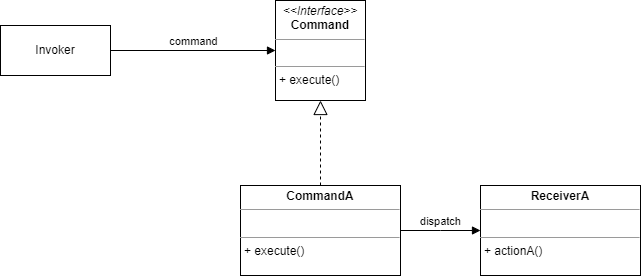
A short breakdown of this diagram:
- The Invoker is the object want to execute a command or a series of commands on some unknown objects, that is, the Invoker might be unaware of them.
- The Command interface. Many classes might implement this interface.
- In this example there is just one class implementing the Command interface, CommandA, which works on ReceiverA. As you can see, the Invoker and the Receiver are not coupled, and the only communication between the two goes via the Command.
Note: I am using Python3.12 for this example. This means that some or all code might not work on earlier versions
Implementation in Python
We will start by defining the Command class. This class has one method with no implementation, therefore it could be called an interface. Because commands all implement the same interface we need this import:
from abc import ABC, abstractmethodThe ABC denotes an Abstract Base Class which is a class containing one or more abstract methods. These abstract methods must be implemented in subclasses, which means the base class can not be instantiated. The methods the subclasses need to implement will be decorated with the @abstractmethod decorator.
The Command base class
The Command base class has two methods: execute() which executes the command, and undo() which performs and undo operation:
class Command(ABC):
    @abstractmethod
    def execute(self):
        pass

    @abstractmethod
    def undo(self):
        pass
Because commands can have different functionalities, both methods are decorated with the @abstractmethod.
The first command: PrintCommand
Next we define the first concrete class, the PrintCommand class:
class PrintCommand(Command):
    def __init__(self, message: str):
        self._message = message

    def execute(self):
        print(self._message)

    def undo(self):
        print(f"[UNDOING] {self._message}")
All the execute() method does here is print out some pre-defined text. The undo() method prints an undo message.
The calculator
The next example is a calculator which only has one command, add. However, this can demonstrate the undo ability, substraction is the opposite of the addition.
We will start by defining the Calculator class:
class Calculator:
    def __init__(self):
        self.value = 0

    def add(self, amount):
        self.value += amount

    def subtract(self, amount):
        self.value -= amount
The AddCommand subclasses Command and uses the Calculator class to perform the calculations:
class AddCommand(Command):
    def __init__(self, calculator: Calculator, amount: int):
        self._calculator = calculator
        self._amount = amount

    def execute(self):
        self._calculator.add(self._amount)

    def undo(self):
        self._calculator.subtract(self._amount)
Line by line:
- The constructor receives an instance of a
Calculatorand the amount by . - In
execute()we add this amount to the current value of the calculator. - And in
undo()we substract this amount from the current value.
The Invoker class.
We now need a way to execute, i.e. invoke this commands:
class Invoker:
    def __init__(self):
        self._commands = []
        self._history = []

    def add_command(self, command: Command):
        self._commands.append(command)

    def execute_commands(self):
        for command in self._commands:
            command.execute()
            self._history.append(command)
        self._commands.clear()

    def undo_last(self):
        if self._history:
            command = self._history.pop()
            command.undo()
Line by line:
- In the constructor we initialize two empty lists: one holds the current commands, the other holds a history of commands, so we can perform undo operations.
- In the
add_command()method we add a command to the commands list. - We also need to be able the current commands list, this is what happens in the
execute_commands()method. This method iterates over the current command list, executes the command, and appends the command to the history list. To prevent commands from accidentally being executed repeatedly the commands list is cleared before exiting the method. - The undo functionality is implemented by the
undo_last()method. This method first checks if there is a history, if then usespop()to remove and return the last element. Finally we callundo()on this element.
Time to test
Now we can test our implementation:
if __name__ == "__main__":

    calculator = Calculator()

    invoker = Invoker()

    print("=== Command Pattern Demo ===")
    print(f"Calculator initial value: {calculator.value}")


    print("\n--- Adding Commands ---")
    add_5 = AddCommand(calculator, 5)
    add_3 = AddCommand(calculator, 3)
    print_msg = PrintCommand("Hello from Command Pattern!")
    add_10 = AddCommand(calculator, 10)

    invoker.add_command(add_5)
    invoker.add_command(add_3)
    invoker.add_command(print_msg)
    invoker.add_command(add_10)


    print("\n--- Executing Commands ---")
    invoker.execute_commands()
    print(f"Calculator value after execution: {calculator.value}")


    print("\n--- Undoing Commands ---")
    invoker.undo_last()
    print(f"After undoing last command: {calculator.value}")

    invoker.undo_last()
    invoker.undo_last()
    print(f"After undoing 2 more commands: {calculator.value}")

    invoker.undo_last()
    print(f"After undoing all commands: {calculator.value}")
A short description:
- We start by creating a
Calculatorobject. - Next we create an
Invokerobject. - Print out the initial value of the calculator.
- Create four commands: one print command and two add commands.
- Add these commands to the invoker and execute them.
- Print out the value of the calculator, this should be 18.
- Finally test the undo capacity, when the history is empty, a call to
undo_lastshould have no effect.
Conclusion
The Command pattern offers a robust solution for decoupling the sender of a request from the receiver. As demonstrated, this behavioral pattern allows actions to be encapsulated as objects, providing greater flexibility and control. We’ve seen how the Invoker can execute various commands on Receivers without needing to know their specific implementations, achieving loose coupling. Furthermore, the pattern inherently supports features like undo/redo functionality and the ability to queue commands, making it invaluable for systems requiring complex operations and history tracking. By abstracting operations into Command objects, your code becomes more organized, extensible, and easier to maintain.


